Wavespeed Review 2026: The Best AI Video API for Builders

Bottom line: Wavespeed is where we've moved all of our AI reel production. 1,000+ models, pay-per-use pricing, a unified API, and no subscription nonsense. If you're building agentic video workflows, this is the platform.
- 1,000+ models under one API — image, video, audio, 3D, digital humans. Every major provider (Google, ByteDance, Alibaba, Kling, Minimax) plus Wavespeed's own models, all through a single endpoint.
- Pure pay-per-use pricing — no monthly subscriptions, no credit packs that expire. You pay for what you generate, and costs match what you'd pay going direct to providers.
- Built for developers, not casual creators — the API is robust with extensive docs, but there are no templates or guided workflows. You need to know what you're building.
- 200+ reels and counting — we've been running our entire tabiji.ai reel pipeline through Wavespeed since switching, progressing from Minimax to Veo 3.1 Lite to Seedance 2.0.
What Is Wavespeed?
Wavespeed is an AI inference platform that gives you unified API access to over 1,000 models for image, video, audio, and 3D generation. Think of it as the aggregator layer that sits between you and every major AI model provider — Google, ByteDance, Alibaba, Kling, Minimax, OpenAI, Midjourney, and dozens more — all behind a single API endpoint and billing account.
The platform positions itself as a purpose-built inference engine with claims of up to 4x faster token generation for LLMs and sub-second rendering for image models. They run their own GPU infrastructure, offer SOC 2 Type II compliance, and support Node.js, Python, and cURL out of the box.
But here's what actually matters: Wavespeed solves the problem of juggling multiple AI provider accounts, each with their own API quirks, billing systems, and rate limits. Instead of maintaining separate integrations with Minimax, Google, ByteDance, and everyone else, you maintain one. For anyone building production pipelines that need to switch between models quickly — which is exactly what we do at tabiji — that's a meaningful operational advantage.
Getting Started
Sign-up is straightforward — create an account, add credits, grab your API key. The dashboard gives you a clean overview: credit balance, recent request volume, models used, and quick links to the API docs and model explorer.
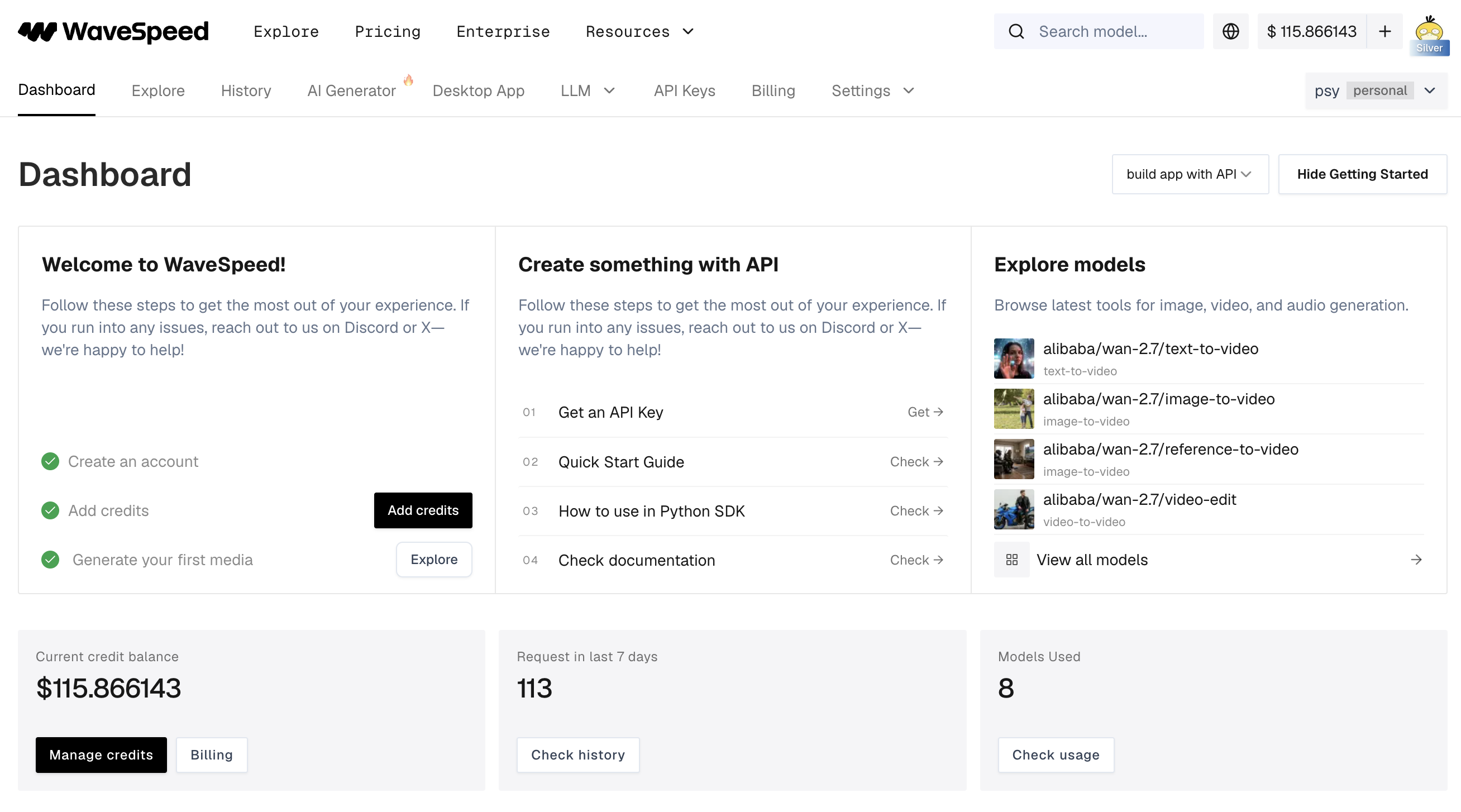
What I appreciated: no onboarding wizard, no forced tutorial, no upsell popup. You land on a dashboard that assumes you know what you're doing — here's your API key, here are the docs, here are the models. Go build something. For a developer-focused tool, this is the right energy.
The getting started flow walks you through four steps: create an account, add credits, generate your first media, and explore models. There's a Python SDK, REST API docs with code examples in cURL, Python, and JavaScript, and a quick start guide that gets you to your first generation in minutes.
Pricing
This is where Wavespeed immediately differentiates from every subscription-based AI video platform I've reviewed. There are no monthly plans. No tiers. No credit packs that expire at the end of the month. You add funds to your account and pay per generation based on the model and output specs.
| Model | Unit | Price | Output per $1 |
|---|---|---|---|
| Hailuo Minimax | Second | $0.01/sec | 100 seconds |
| Wan 2.6 | Second | $0.08/sec | 12.5 seconds |
| Seedance 2.0 | Second | $0.10/sec | 10 seconds |
| Veo 3.1 | Second | $0.12/sec | 8.3 seconds |
| Kling O3 | Second | $0.15/sec | 6.6 seconds |
| Flux Dev Ultra Fast | Image | $0.005/img | 200 images |
| Seedream V4.5 | Image | $0.04/img | 25 images |
| Midjourney | Image | $0.08/img | 12 images |
| Nano Banana Pro | Image | $0.14/img | 7 images |
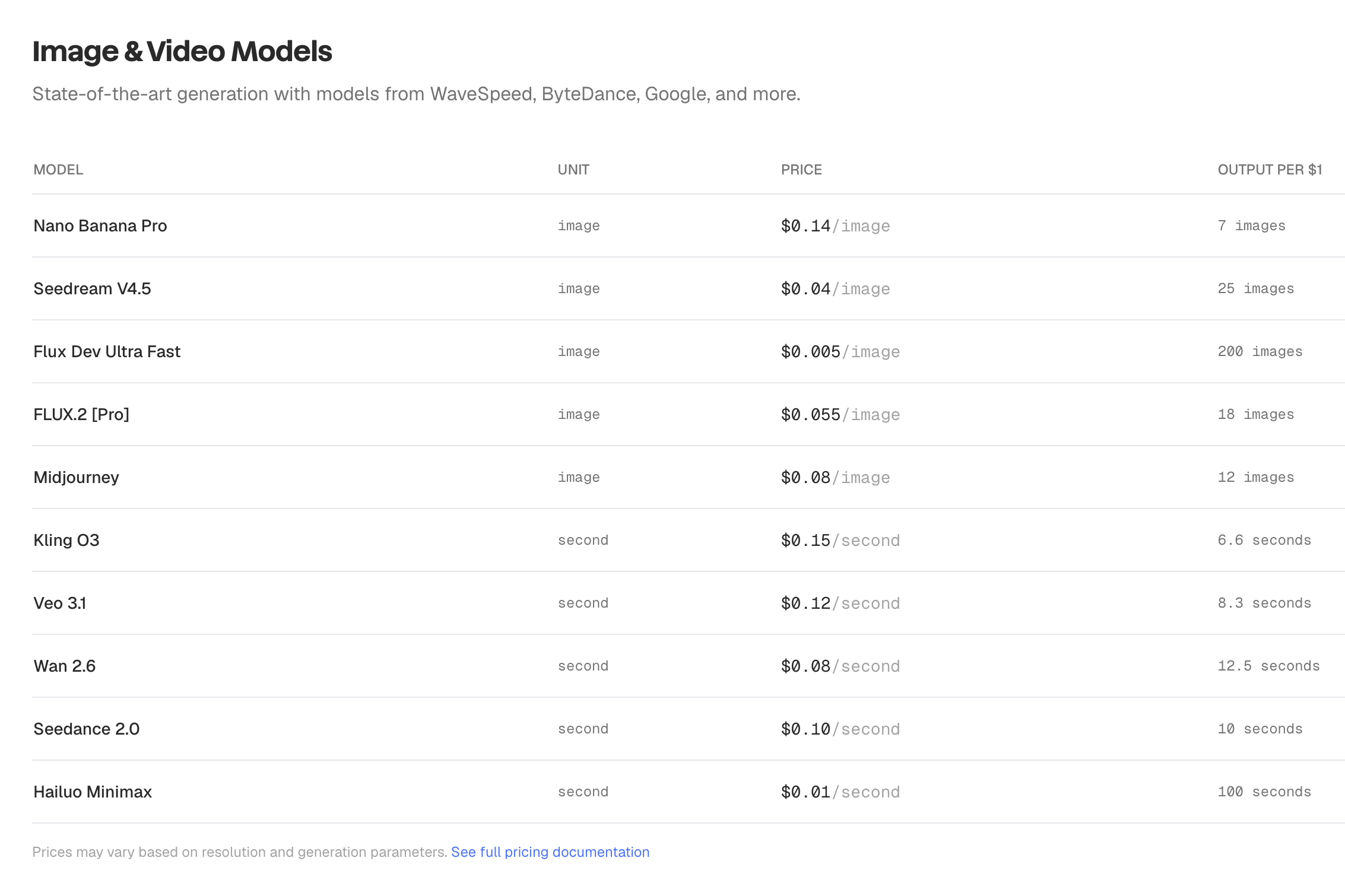
The key insight: Wavespeed's pricing is essentially identical to what you'd pay going direct to each provider. You're not paying a premium for the aggregation layer — you're getting the convenience of a single API and billing relationship at parity pricing. After 200+ reels through the platform, I've had zero billing surprises or unexpected costs.
Compare this to subscription platforms where you're paying $49-$119/month for a fixed number of credits, and unused credits vanish at the end of the billing cycle. With Wavespeed, your balance sits there until you use it. No expiry. No waste.
The best pricing model in the AI video space for builders. Pay-per-use with no subscriptions, no expiring credits, and costs that match going direct to providers. This is how all AI platforms should price.
The Model Library
This is Wavespeed's most impressive asset. Over 1,000 models across 20+ categories — and it's not filler. These are production-grade models from every major provider in the space:
- Text-to-video (92 models) — including Veo 3.1, Seedance 2.0, WAN 2.7, Hailuo Minimax, Kling, Sora
- Image-to-video (182 models) — the largest category, critical for reference-image-based workflows
- Text-to-image (123 models) — Flux, Midjourney, Seedream, Nano Banana, DALL-E
- Image-to-image (136 models) — style transfer, editing, upscaling
- Video effects (70 models) — post-processing, transitions, enhancements
- Text-to-audio (42 models) — music, sound effects, voiceovers
- Digital humans (35 models) — including Wavespeed's own InfiniteTalk
- 3D generation (14+ models) — text-to-3D and image-to-3D
What makes this library genuinely useful isn't just the breadth — it's the access to models that are hard to get elsewhere. Seedance 2.0 availability was limited when it launched, and Wavespeed was one of the few platforms offering API access. Same story with Kling and several of the Alibaba WAN models. If you're trying to evaluate or deploy a newly released model, Wavespeed usually has it faster than you can set up a direct integration with the provider.
For our workflow at tabiji, this meant we could test Minimax, evaluate Veo 3.1 Lite, and then migrate to Seedance 2.0 — all without changing our API integration. Same endpoint, same auth, same billing. Just swap the model ID in the request body. That's the real value of an aggregator done right.
API & Developer Experience
The API is where Wavespeed earns its keep. A unified REST endpoint at /api/v3/{model_uuid} handles all models — submit a task, check status, retrieve results. The docs are thorough, with code examples in cURL, Python, and JavaScript for every model.
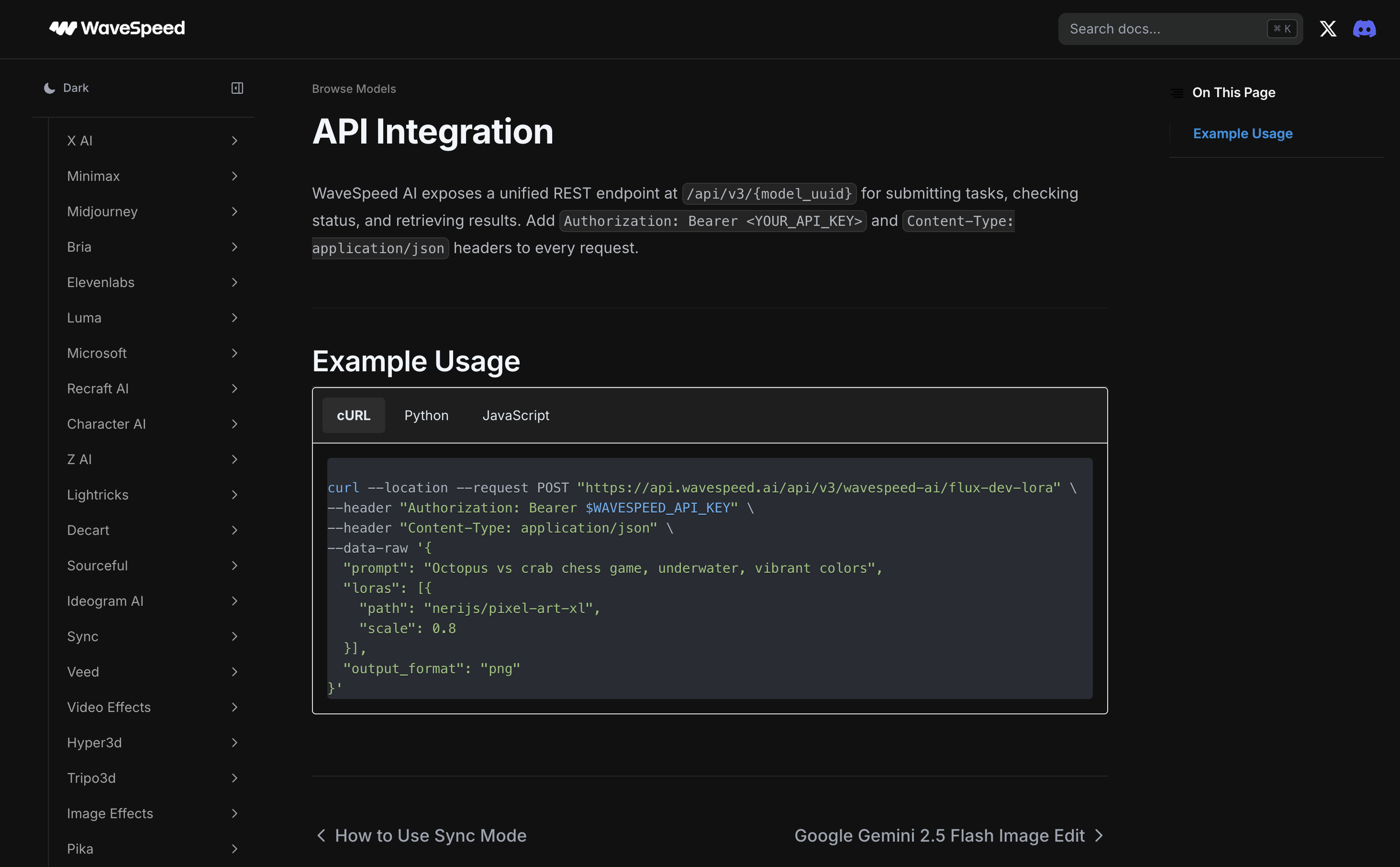
The sidebar in the docs lists every supported provider — X AI, Minimax, Midjourney, Bria, ElevenLabs, Luna, Microsoft, Recraft, Character AI, Lightricks, and many more. Each provider section includes model-specific parameters, pricing, and ready-to-copy code snippets.
For agentic workflows, this is exactly what you need. Our tabiji pipeline calls the Wavespeed API programmatically — prompt goes in, video comes out. No browser automation, no GUI clicking, no manual steps. The API supports both sync and async modes, so you can fire off a generation and poll for completion, or wait for the result inline.
One of the most developer-friendly AI APIs I've used. Unified endpoint, comprehensive docs, and the model breadth to back it up. This is how you build production video pipelines.
Desktop App & Playground
Beyond the API, Wavespeed offers a web-based playground and a native macOS desktop app — both useful for testing models before committing to them in production code.

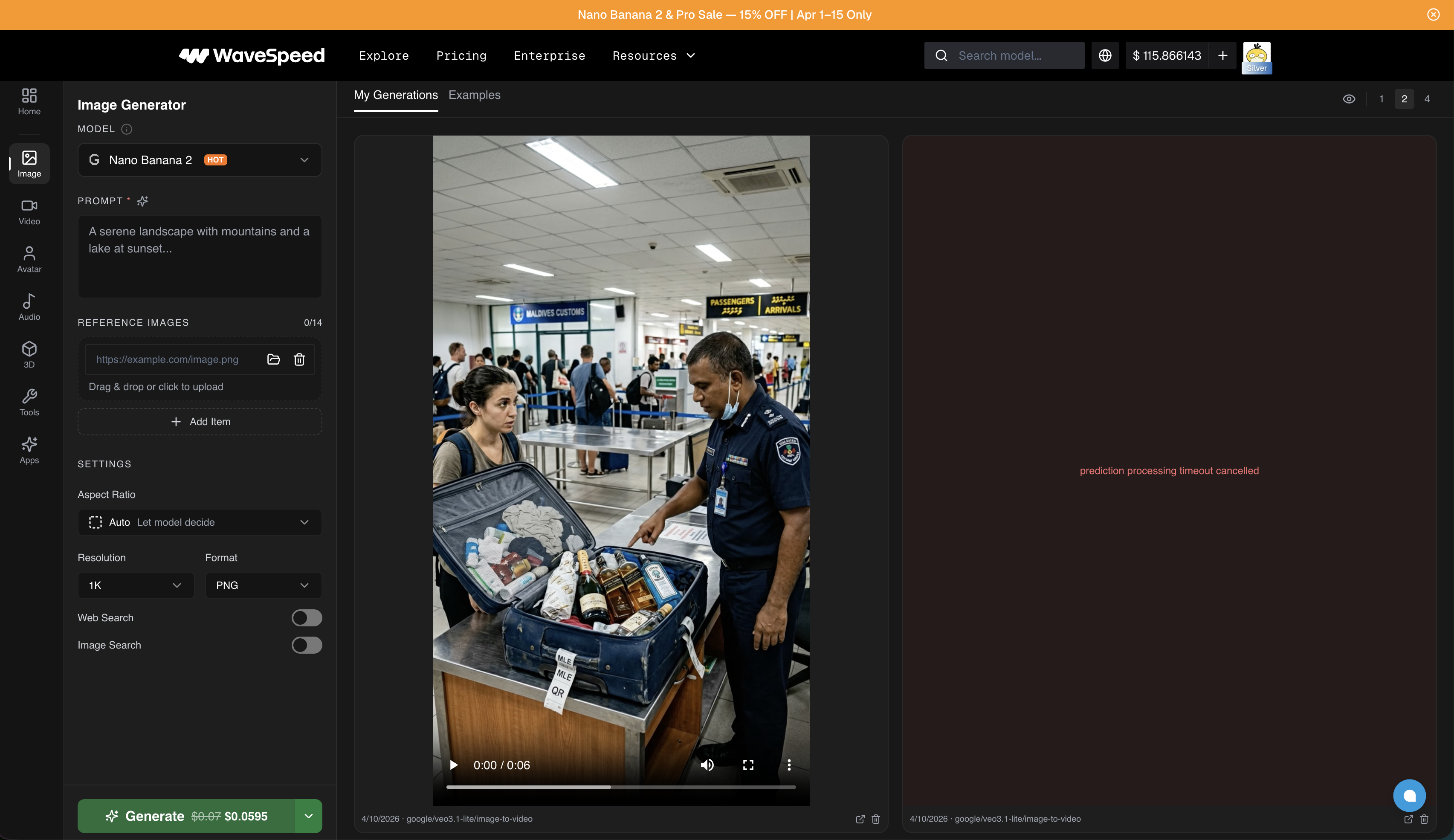
The playground is where I spend time evaluating new models before wiring them into our pipeline. Pick a model from the dropdown, write a prompt, adjust settings (aspect ratio, resolution, format), and hit generate. It costs the same credits as an API call, but the visual interface makes it easier to iterate on prompts and compare outputs side-by-side.
This was critical for our model progression. Before switching from Minimax to Veo 3.1 Lite, I ran the same prompts through both models in the playground to compare quality. Then again when evaluating Seedance 2.0. Being able to A/B test without writing throw-away code is a genuine time-saver.
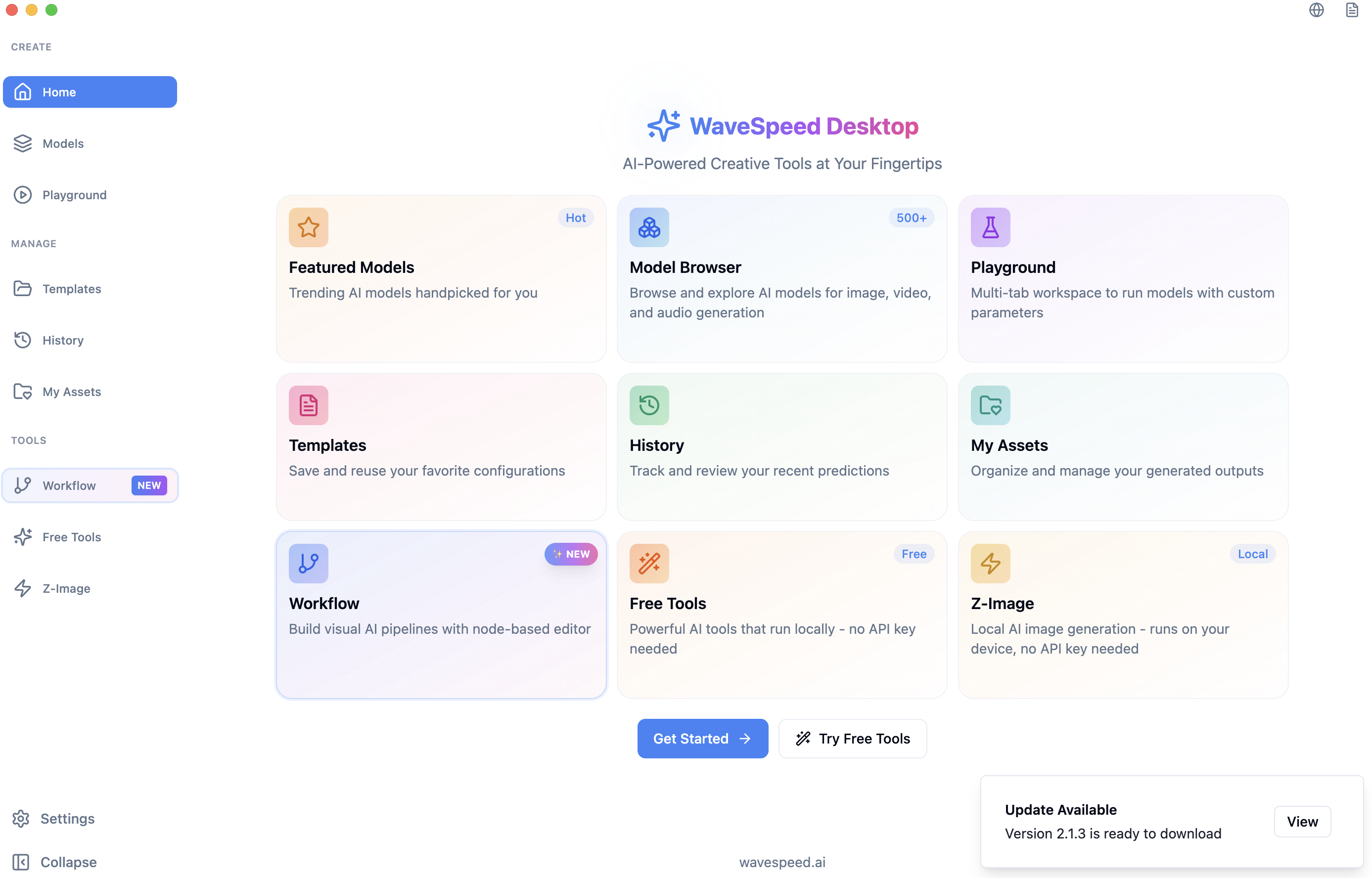
The desktop app adds a few extras: a visual workflow builder (node-based editor for chaining models), template saving, generation history, and some free tools that run locally without an API key. It's a nice complement to the API-first workflow, though the API is where the real production work happens.
What I Liked
The model library is the headline. 1,000+ models across every category, with new ones added regularly. When a new model drops — Seedance 2.0, a new WAN variant, whatever — Wavespeed typically has it available within days. For a team that needs to stay on the cutting edge of video generation, that speed of access is worth more than any individual feature.
The pay-per-use pricing is how every AI platform should work. No subscriptions, no expiring credits, no unused capacity. I load up credits and they sit there until I need them. After 200+ reels, the costs match what I'd be paying going direct to each provider. You're getting the convenience of aggregation without a markup.
The API is genuinely robust. Unified endpoint, extensive documentation, code examples in three languages, and a clean async model for production use. Wiring Wavespeed into our agentic reel pipeline at tabiji was straightforward — and more importantly, switching between models is a one-line change in our code.
The playground is an underrated feature. Being able to test a model visually before committing to it in production code saves real time. I used it to evaluate every model transition we made — Minimax to Veo 3.1 Lite to Seedance 2.0 — without writing disposable scripts.
What Frustrated Me
Wavespeed was slow to give access to Seedance 2.0 when it launched. This is a platform that sells itself on breadth and speed of model access, so any delay is more noticeable. Other models I've tested were available quickly, but the Seedance 2.0 gap was frustrating since it was the model I specifically needed for our production pipeline.
I hit reliability issues with SkyReels when running them through Wavespeed's GPUs at 720p. Failed renders, inconsistent outputs. This was specific to one model family at one resolution, and everything else has been smooth — but when you're running production workloads, a single unreliable model can eat time diagnosing whether the problem is your code, the model, or the infrastructure.
There's no handholding. If you don't know what prompt to write, which model to pick, or how to structure a video generation workflow, Wavespeed won't help you figure it out. There are no templates, no content libraries, no guided workflows. The docs are excellent for technical integration, but they assume you already know what you're building and why. For a developer tool, this is fine. For anyone else, it's a wall.
How It Compares
Wavespeed vs. going direct to providers: The main trade-off is convenience vs. control. Going direct to Google (Veo), ByteDance (Seedance), or Minimax gives you the provider's native API with potentially more model-specific options. Wavespeed gives you one integration that covers all of them at matching prices. After managing multiple provider accounts early on, the single-API approach won out for us.
Wavespeed vs. Replicate / Fal: All three are inference platforms, but Wavespeed's model library is significantly larger — especially for video models. Replicate and Fal tend to have stronger communities around open-source image models (Flux, Stable Diffusion), while Wavespeed has better coverage of commercial video models (Seedance, Kling, Veo). If video is your primary use case, Wavespeed has the edge.
Wavespeed vs. MakeUGC / Creatify / Arcads: Completely different products. MakeUGC and its competitors are managed platforms with avatars, templates, and guided workflows — you're paying ~$10/video for the convenience layer. Wavespeed is the raw infrastructure underneath. If you can build your own pipeline, Wavespeed gives you the same (or better) model access at a fraction of the cost. If you can't, look at the managed platforms.
Skip Wavespeed If...
- You want done-for-you content. Wavespeed is infrastructure, not a content creation platform. There are no templates, avatars, or content libraries. If you need a guided workflow that takes you from script to finished video, look at MakeUGC, Creatify, or Arcads instead.
- You're not comfortable with APIs. Every interaction with Wavespeed beyond the playground requires writing code or using API tools. If REST endpoints and JSON payloads aren't in your vocabulary, this isn't your tool.
- You only need one model. If you know exactly which model you want and you'll never switch, going direct to that provider might be simpler. Wavespeed's value is in the aggregation — if you don't need breadth, you don't need Wavespeed.
- You need real-time or streaming generation. The async API pattern (submit job, poll for result) works great for batch and pipeline workflows, but if you need sub-second interactive generation, check their sync mode limitations for your specific model.
Final Verdict
Wavespeed is the best AI video API platform for developers and technical teams building production pipelines. The model library is unmatched at 1,000+, the pay-per-use pricing is honest and transparent, the API is robust, and the aggregation genuinely saves operational overhead. After 200+ reels through the platform for tabiji.ai, it's become our default infrastructure for all AI video generation.
What would push this to a perfect score? Faster access to newly released models (the Seedance 2.0 delay stung), and better reliability guarantees across all models and resolutions. Both are solvable — and the core product is strong enough that these feel like growing pains, not structural issues.
Overall: 4.5/5 — the go-to platform for anyone building AI video pipelines. The model library, pricing model, and API quality set the standard for what an AI inference platform should be.
Try Wavespeed → — pay-per-use, no subscription required. Add credits and start generating.
FAQ
Is Wavespeed worth it for AI video production?
If you're building automated video pipelines or need API access to multiple AI models, yes. Wavespeed's unified API, pay-per-use pricing, and 1,000+ model library make it the most practical option for developers and technical teams. We've pushed 200+ reels through it for tabiji.ai with no billing surprises and competitive per-generation costs. The value proposition is strongest when you need access to multiple models and want a single integration point.
How does Wavespeed compare to Replicate and Fal?
All three are AI inference platforms, but they serve slightly different niches. Wavespeed's model library is significantly larger — 1,000+ models across 20+ categories, with particularly strong coverage of commercial video models like Seedance 2.0, Kling, and Veo. Replicate and Fal have stronger communities around open-source image models. If video generation is your primary use case, Wavespeed has the broadest selection. Pricing across all three is competitive.
What AI models does Wavespeed support?
Over 1,000 models across image, video, audio, 3D, and digital human categories. Major integrations include Google (Veo 3.1), ByteDance (Seedance 2.0), Alibaba (WAN 2.6/2.7), Kling, Minimax Hailuo, Midjourney, OpenAI (Sora), Flux, and Wavespeed's own proprietary models like InfiniteTalk and Phota. New models are typically added within days of public release.
Is Wavespeed good for beginners or non-technical users?
Not really. Wavespeed is built for developers and technical teams who can work with APIs, write prompts, and build their own workflows. The desktop app and web playground help with testing and evaluation, but there are no templates, content libraries, or guided workflows. If you want a done-for-you video creation experience, look at managed platforms like MakeUGC or Creatify instead.
How much does Wavespeed cost per video?
It depends entirely on the model and output specifications. Hailuo Minimax is the cheapest at $0.01/second, while Veo 3.1 runs $0.12/second and Kling O3 is $0.15/second. For a typical 5-second reel clip, you're looking at $0.05 to $0.75 depending on the model — dramatically cheaper than subscription platforms that charge $5-10 per video. There are no monthly fees — you add credits to your account and pay per generation.